Stop Buddy Punching. Automate Multi-Rate Payroll. Protect Your Margins.
Running an independent restaurant, retail shop, or workshop means juggling shifting floor roles, tight labor budgets, and strict wage-and-hour regulations. Team Clock Pro replaces fragile paper timesheets and overpriced proprietary hardware terminals with a tamper-proof, browser-based punch clock built specifically for small business realities.
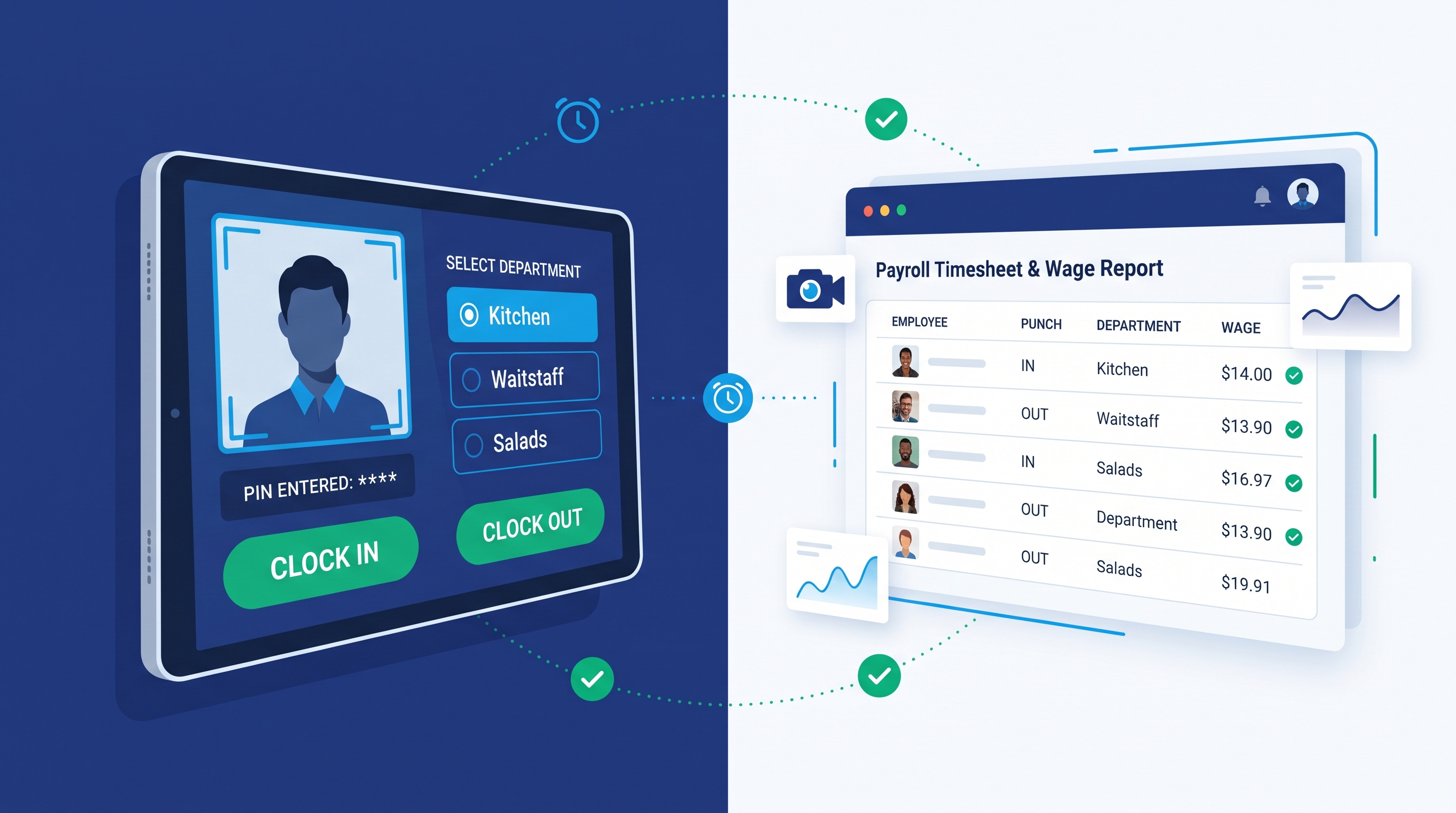
1. Front-Camera Photo Verification (Zero Buddy Punching)
Time theft through "buddy punching"—where one employee clocks in or out for a late coworker—quietly drains thousands of dollars from small business payrolls every year. Traditional biometric fingerprint readers and 3D facial-geometry scanners solve this at a steep cost: they fail when hands are wet or gloved in a kitchen, require expensive proprietary terminals, and expose employers to strict biometric privacy lawsuits.
Team Clock Pro eliminates buddy punching with a fast, transparent visual audit trail:
- Automatic Front-Camera Trigger: The moment a team member selects their name, enters their 4-digit PIN, and taps submit, Team Clock Pro utilizes native HTML5 media capture (
accept="image/*" capture="user") to snap an instant photo using the tablet’s front-facing camera. - Zero Biometric Friction: We never scan, map, or store facial geometry vectors. The system simply attaches a lightweight, high-clarity visual photograph directly to the time punch record.
- Private Encrypted File Storage: Unlike consumer apps that leave images in public cloud buckets or on the tablet’s local camera roll, every audit photo is routed directly into an isolated, non-public private filesystem on our LEMP-hardened servers.
- Side-by-Side Manager Review: Managers view thumbnail audit snapshots directly inside the payroll timesheet table, making it effortless to spot discrepancies in seconds.
[Image/Graphic Description — Feature Card 1]: Illustration of an employee in a small business setting entering a 4-digit PIN on a wall-mounted tablet, displaying an instant front-camera photo verification frame with a
#10B981Punch-In Emerald verification checkmark badge. * Suggested Filename:card-photo-verification.jpg* Alt Text: Employee entering a 4-digit PIN on a wall-mounted tablet with instant front-camera photo verification
2. Touch-Friendly Multi-Department Wage Tracking
Small businesses rely on cross-trained staff. An employee might prep in the Kitchen at $\$19.50/\text{hr}$ during the morning, clock into Waitstaff at $\$12.00/\text{hr}$ plus tips for the lunch rush, and cover Salads at $\$17.00/\text{hr}$ for evening shift prep. Most entry-level time clocks force you to assign a single static pay rate per worker—leaving managers to manually recalculate split-rate shifts in spreadsheets on payroll Friday.
Team Clock Pro automates variable shift pay from the moment an employee clocks in:
- Employee Profile Wage Matrices: Administrators configure multiple eligible departments and distinct hourly pay rates inside each worker’s central Employee Profile.
- Glare-Resistant, Touch-Friendly Role Selection: When clocking in at the wall tablet, staff tap large, high-contrast $56\text{px}$ radio buttons to select their active department for that specific shift.
- Automated Gross Wage Calculation: Our reporting engine automatically cross-references each punch’s selected department against that employee’s specific department wage rate, calculating exact shift time deltas and gross wages earned down to the penny: $$\text{Shift Wages Earned} = \left(\text{Clock Out Timestamp} - \text{Clock In Timestamp}\right) \times \text{Employee Department Rate}$$
- One-Click CSV & Excel Payroll Exports: Filter your timesheet view by pay period and export a clean, grouped CSV or Excel spreadsheet ready for your bookkeeper or payroll processor.
[Image/Graphic Description — Feature Card 2]: Close-up vector illustration of a tablet touchscreen showing large Precision Sky (
#0EA5E9) department radio buttons for Kitchen, Waitstaff, and Salads connected via data lines to automated hourly wage calculation badges ($19.50/hr,$12.00/hr,$17.00/hr). * Suggested Filename:card-department-wages.jpg* Alt Text: Touchscreen department selection for Kitchen, Waitstaff, and Salads connected to automated hourly wage calculations
3. Server-Locked Timestamps & Automated Meal Break Compliance
Allowing staff to clock in on personal smartphones or offline-cached tablets creates an immediate vulnerability: anyone can adjust their device’s internal system clock to hide a late arrival or pad overtime hours. At the same time, failing to enforce mandatory meal breaks can trigger costly state labor board penalties.
Team Clock Pro enforces timekeeping compliance automatically at the server level:
- Tamper-Proof Server Timestamps: The timestamp field on every punch is hidden from the user interface and locked strictly to our backend server clock (
REQUEST_TIME) upon submission. Changing the tablet’s local time or timezone settings has zero effect on recorded punch times. - Mandatory 30-Minute Meal Break Enforcement: When an employee taps Meal Break End, our validation engine inspects their preceding Meal Break Start punch and verifies that at least $30\text{ minutes}$ ($1,800\text{ seconds}$) have elapsed.
- Real-Time Remaining Break Countdown: If an employee tries to clock back in early from a meal break, the system blocks the premature punch and displays an unmistakable Break Amber (
#F59E0B) alert showing the exact number of minutes remaining before they are legally permitted to return to work. - Sequence Guard Clauses: Built-in logic prevents staff from accidentally ending a meal break they never started or submitting out-of-sequence punches.
[Image/Graphic Description — Feature Card 3]: Graphic depicting a Trust Navy (
#1E3A8A) server-locked timestamp shield paired with a Break Amber (#F59E0B) 30-minute meal break compliance countdown timer and a green manager approval badge. * Suggested Filename:card-tamper-proof-compliance.jpg* Alt Text: Server-locked timestamp shield with a 30-minute meal break compliance timer and manager approval badge
4. Audit-Proof Missed Punch & Adjustment Workflow
In a fast-paced workplace, honest mistakes happen—a line cook forgets to punch out after a double shift, or a server taps the wrong department during a dinner rush. However, letting employees edit or backdate their own timecards destroys audit integrity.
Team Clock Pro keeps your primary timecards $100\%$ immutable through a two-step Punch Adjustment Request workflow:
- Dedicated Tablet Correction Button: Right next to the main punch screen, staff can tap Submit Missed Punch / Correction, verify their identity with their 4-digit PIN, select the target date, time, department, and punch type, and write a brief explanation note.
- Manager Moderation Queue: Requests land in a dedicated administrative view filtered by
Pendingstatus. Managers review the employee’s note alongside surrounding shift records and approve or reject the request with one click. - Automated Time Punch Generation &
[Edited]Badges: Upon manager approval, Team Clock Pro automatically generates the corresponding chronological punch, links it directly to the original adjustment request node, and flags it with a visible[Edited]/ Manual Entry indicator on payroll reports for complete HR and labor-audit transparency.
[Image/Graphic Description — Adjustment Workflow Diagram]: A horizontal 3-step flowchart in brand colors: Step 1 shows an employee submitting a "Missed Punch Request" with PIN verification on the tablet; Step 2 shows a manager clicking "Approve" in the Pending Adjustments dashboard; Step 3 shows the chronological timesheet updated with a linked
[Edited]audit badge. * Suggested Filename:workflow-punch-adjustment.svg* Alt Text: Three-step diagram showing how employee missed punch requests are approved by managers and logged with an audit trail badge
5. Hardware Independence & Edge Network Security
Why pay $\$800$ to $\$2,000$ for a proprietary plastic wall terminal that locks you into a multi-year vendor contract? Team Clock Pro is engineered on a hardened LEMP stack and open-source Backdrop CMS architecture, turning any commercial tablet into a locked-down workplace kiosk:
- Bring Your Own Tablet (BYOT): Runs smoothly inside any modern mobile browser on Apple iPad (iOS/iPadOS), Samsung Galaxy Tab (Android), or affordable Amazon Fire HD (FireOS) tablets.
- Single Shared Kiosk Session, Individual PIN Security: Your wall tablet stays persistently logged into a restricted
employeekiosk account—eliminating slow individual username/password logins between shifts while validating each punch against the worker’s private 4-digit PIN. - Nginx IP Whitelisting & HTTP Basic Auth: Even though Team Clock Pro runs in the cloud, your punch interface is shielded at the Nginx web server edge. Only devices connected to your physical workplace’s whitelisted IP address and authenticated via server-level
htpasswdcredentials can load the punch clock—making remote off-site punching impossible.
Ready to Stop Payroll Errors and Buddy Punching?
See how Team Clock Pro fits your floor workflow in a live, no-pressure walkthrough, or start your 1-Year Free Small Business Plan today. * Request a Live Demo | View Transparent Pricing